在线下载鲁班猫SDK源码
在线下载鲁班猫SDK源码
最好在Ubuntu开启魔法,不然可能会失败
环境配置
SDK 开发环境搭建
# 安装SDK构建所需要的软件包
# 整体复制下面内容到终端中安装
sudo apt install git ssh make gcc libssl-dev liblz4-tool u-boot-tools curl \
expect g++ patchelf chrpath gawk texinfo chrpath diffstat binfmt-support \
qemu-user-static live-build bison flex fakeroot cmake gcc-multilib g++-multilib \
unzip device-tree-compiler python3-pip libncurses5-dev python3-pyelftools dpkg-dev
安装repo
mkdir /home/okay/Documents/Linux/bin
curl https://storage.googleapis.com/git-repo-downloads/repo > /home/okay/Documents/Linux/bin/repo
# 如果上面的地址无法访问,可以用下面的:
# curl -sSL  'https://gerrit-googlesource.proxy.ustclug.org/git-repo/+/master/repo?format=TEXT' |base64 -d > ~/bin/repo
chmod a+x /home/okay/Documents/Linux/bin/repo
echo PATH=/home/okay/Documents/Linux/bin:$PATH >> ~/.bashrc
source ~/.bashrc

#验证安装成功
repo --version
SDK 源码获取
# 创建存放目录
mkdir /home/okay/Documents/Linux/Lubancat_SDK

# 查看是否是python3版本
python -V

# SDK在线下载并同步
cd /home/okay/Documents/Linux/Lubancat_SDK

# 下面的步骤要开魔法
# 拉取LubanCat-RK3588系列Linux_SDK
repo init -u https://github.com/LubanCat/manifests.git -b linux -m rk3588_linux_release.xml

#如果运行以上命令失败,提示:fatal: Cannot get https://gerrit.googlesource.com/git-repo/clone.bundle
#则可以在以上命令中添加选项 --repo-url https://mirrors.tuna.tsinghua.edu.cn/git/git-repo

#即
repo init -u https://github.com/LubanCat/manifests.git -b linux -m rk3588_linux_release.xml --repo-url https://mirrors.tuna.tsinghua.edu.cn/git/git-repo

#同步
.repo/repo/repo sync -c -j4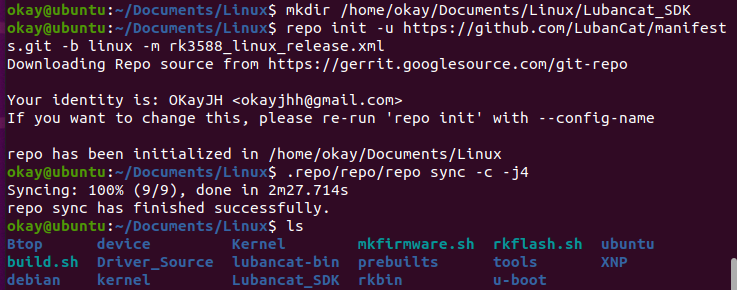


评论